
Before you report
Confirm payment status in your bank / UPI app, match amount and details, review deposit history if available, and keep the transaction reference.
Guide · 2026
Need help with a deposit, withdrawal, login problem, or another account issue? The Self Service Center brings several help topics together so you can match instructions to your problem before trying random fixes.
Open your account help menu
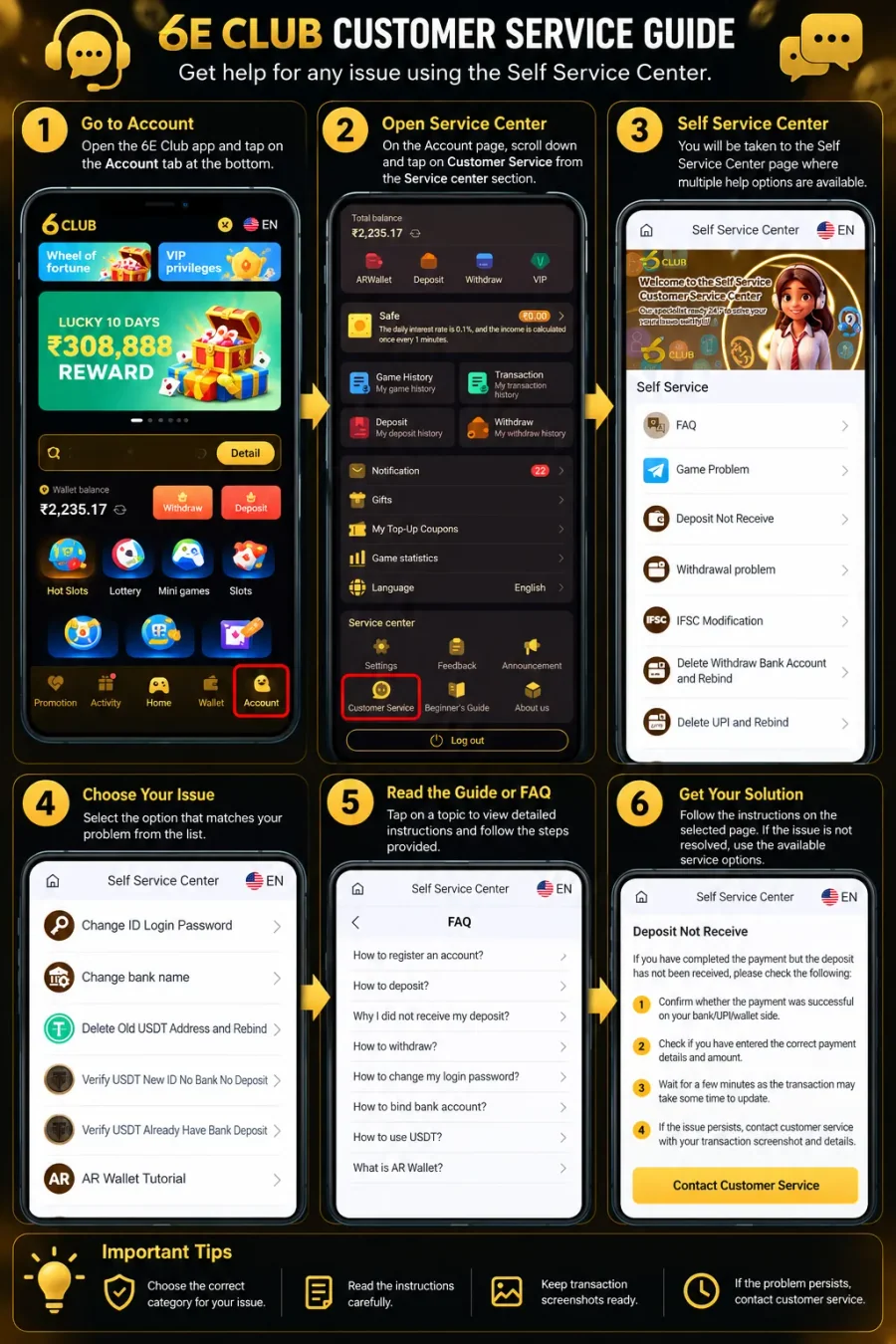
Sign in first, then use Account → Customer Service inside the app interface.
The Customer Service option is available in the Account section of the app interface.
Account → Service center → Customer Service
Use a login page you have verified. If you cannot sign in, seek help only through a channel you can independently verify — never share your password or OTP.
Tap Account from the bottom navigation.
Find the Service center block on the Account page.
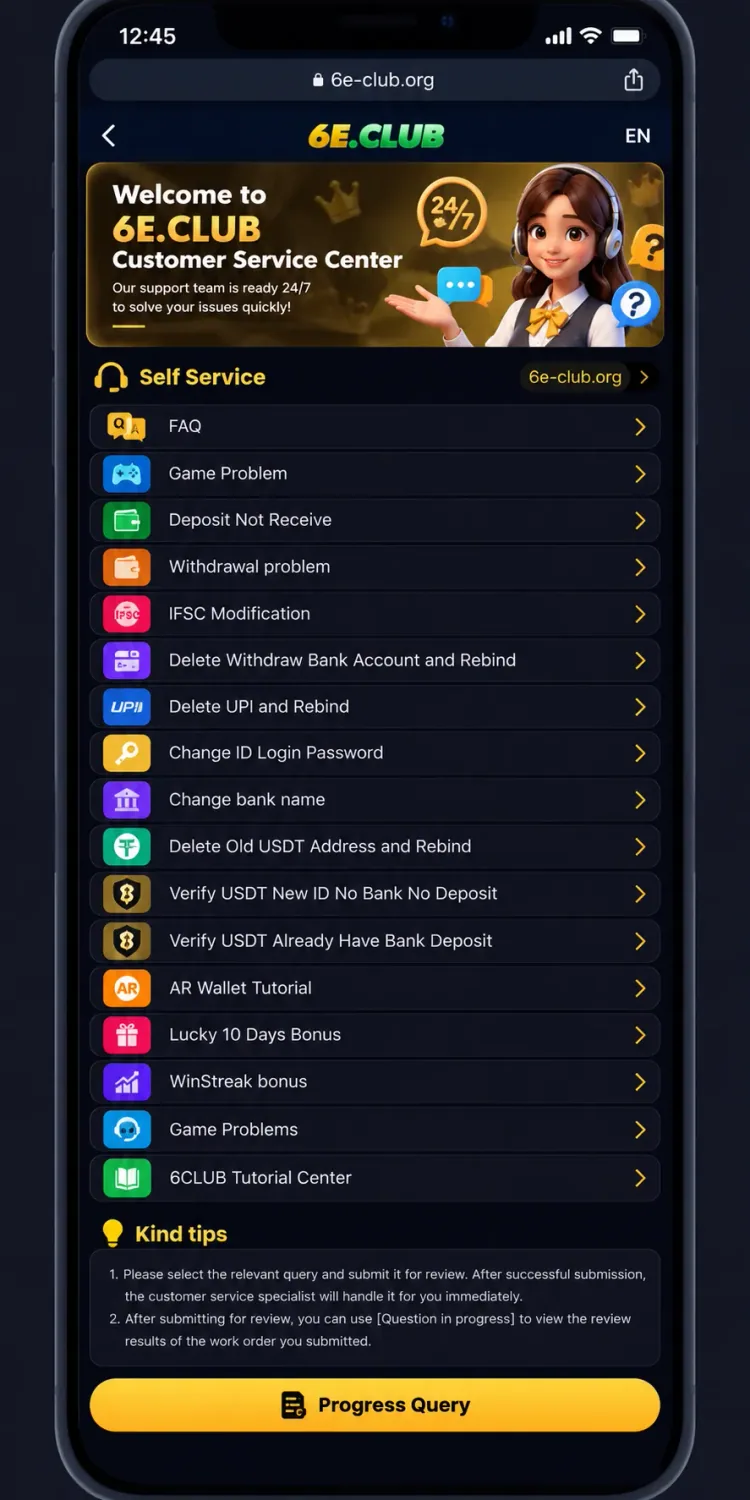
The Self Service Center opens with a list of help topics.
The Account section also contains Settings, Feedback, Announcement, Beginner’s Guide and About Us. For a specific issue, start with Customer Service rather than an unrelated option.
The Self Service Center organises help by problem type.
Choose the option that most closely matches your issue. Read the next page carefully and follow only the steps that apply.
If the first topic does not help, return to the menu and try another relevant category. Avoid submitting multiple requests for the same issue before checking whether an earlier request was already recorded.
The FAQ section is a useful starting point for general questions.
Look for the question that best describes your problem. Topics may cover registration, deposits, missing deposits, withdrawals, login password changes, bank-account binding and USDT. Read the full answer before acting. If instructions do not match your account, return to the Self Service Center for a more relevant topic.
A deposit issue can mean a payment is still processing, the wallet has not updated, or payment details need checking.
Use Deposit Not Receive
If a withdrawal is delayed or you cannot submit a request, review the withdrawal information in your account first.
Open the Withdrawal problem topic and follow the instructions for your specific case.
Look for Change ID Login Password for password-related help. If you cannot sign in, confirm you are using the correct details on a verified login page, then use recovery instructions if available.
If you lost access to registered contact details, check for an alternative recovery process. Do not use another person’s information to bypass verification.
Several payment-information topics cover bank details, UPI and USDT addresses.
Use Game Problem for gameplay issues. Note which game you used, what happened, and when. Keep relevant history references.
Feedback, Announcement and Beginner’s Guide may help with general information, while Customer Service is the direct start for account or transaction issues. Pick one matching category — do not file the same complaint under several unrelated topics.
Never include in a support request
6E Club Login Guide
Sign-in and account-access help.
6E Club Register Guide
General registration instructions.
6E Club Deposit Guide
How to add money and check deposit status.
6E Club Withdrawal Guide
How to withdraw and track a request.
Invitation Guide
Referral link, QR code and commission claims.
VIP Dashboard Guide
Levels, EXP, rewards and rebate rate.
This guide explains how to navigate the visible Customer Service and Self Service Center options. Topics and instructions may change — always follow what the platform shows today.
This article is informational and does not establish official affiliation with 6E Club. It does not guarantee a particular response time or the resolution of any account or transaction issue.